5 Ways to Get More Out of Your Garmin
Your Garmin is already one of the most powerful tools in your training arsenal but chances are, you’re only tapping into a fraction of its potential.
Built for performance, precision, and insight, Garmin devices go far beyond tracking your time and distance. When set up right, they become a personalised coach on your wrist, guiding your pacing, optimising your recovery, and helping you train smarter every single day.
In this guide, we’re breaking down five simple but often overlooked ways to get more out of your Garmin. From customising your data screens to unlocking deeper insights like HRV and PacePro, these tips will help you tap into the full potential of your device and ultimately, your performance.
1: Setting Up Your Data Screens
Most people will set their watch up out of the box with the default settings. The beauty with Garmin is the ability to customise the watch to your personal needs to maximise your experience. This stems from the widgets on your watch face to the Data Screens you view in your activity.
I would recommend utilising the Activity settings and personalising the data screens you view in your activity and become aware of the amazing data sets you can view. These can include things like Pace, Distance, Time & Heart Rate Fields, as well as things like Running Stamina and Run Dynamics.
2: Built to wear 24/7
If you’re data hungry like I am and want to get the most out of features like Training Status and Training Readiness. This will require wearing the watch 24/7 and yes sleeping in it. The watch can only see what you provide it, if it can see how you recover the more accurate it will become for your personal self. This will improve things like Vo2 Max, Recommended Workouts and get rid of those Unproductive Training Status’s.
3: Make sure your Satellite settings are correct
Once again most people set their Garmin’s up with the default Satellite Settings. This can be great for battery saving and is still extremely accurate in open spaces (Parks, waterfronts). If you’re someone who wants the most reliable, accurate data or out exploring in the outback and/or urban jungle, changing these settings can make a difference.
Top units like the Forerunner 970, 570 & 965 utilise All Systems + Multi-Band this uses multiple satellite constellations (GPS, GLONASS, Galileo, etc.) and two, rather than one, radio frequencies (L1 and L5) to provide the highest possible location accuracy. This setting significantly improves tracking in challenging environments like deep forests or urban canyons.
4: PacePro
If you’re someone who struggles to control their pace when it comes to race day or those longer training days. PacePro is the feature for you. This feature offers pace guidance on the watch during outdoor run activities to help you stay on track during training. When PacePro is applied to a course loaded to your watch, it analyzes elevation changes along the course to calculate a pace strategy. A PacePro Strategy is created by using a course found in the Garmin Connect™ app. The strategy calculates when to increase or decrease your pace along the course for the best overall pace.
5: HRV
If you’re someone who lives a busy lifestyle or struggles with illness HRV is the feature for you. HRV is the varying time between heartbeats, and the milliseconds of difference between heartbeats can help you understand how stressed or well-rested you are. That’s where Garmin HRV status comes in. After the first three weeks of sleeping with your compatible Garmin smartwatch, it will provide a baseline status. Your HRV status on your Garmin watch can be balanced, unbalanced (above or below your baseline), low or poor. If your HRV is below your baseline, that may indicate a lack of sleep, stress, illness or overtraining. Although an above baseline reading may indicate overtraining as well. HRV also plays a role in your sleep, stress level and Body Battery metrics. 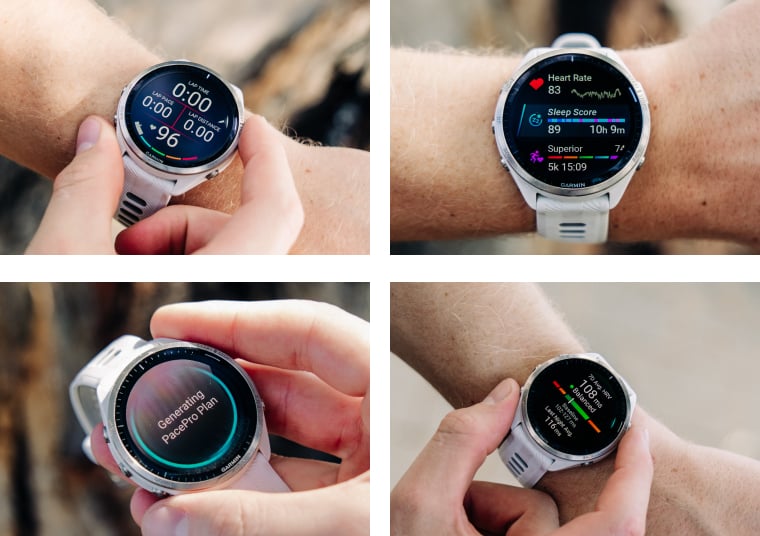
Wrap Up
Ultimately, getting the most out of your Garmin involves more than simply wearing it during training sessions; it requires an understanding of how to use its data and features in a way that aligns with your individual goals. From customising your data screens and refining satellite accuracy, to making better use of tools such as PacePro, HRV and 24/7 recovery insights, these seemingly small adjustments can have a significant impact on both training quality and recovery. From an expert perspective, the most effective approach is to take the time to configure your device correctly, wear it consistently, and develop a clear understanding of what the metrics are indicating. When used to its full capability, a Garmin is far more than a watch, it'a a sophisticated performance tool that can support more informed and effective training decisions.
About the Author
Ed - Runner & Content Specialist
I’m a distance runner and Performance Content Specialist at RunDNA, with a passion for running, road and gravel cycling, quality gear, and the stories shaped by effort and adventure. My current focus is long-distance road running and triathlon, driven by a love of performance and the challenge of pushing body and mind further.